AI Briefings on Politics pages
On this page
An AI Briefing is a short summary, written by AI, that sits near the top of a Politics page. It is built from the records on that page, such as a vote's tally and party split or a bill's status and sponsor, and from a few recent headlines, so you can take in the gist before you read the details.
#Where you see it
An AI Briefing appears on the Politics overview and on the page of a member, a bill, a vote, a race and the Elections page. On a Politics search results page and on a topic page, where there are headlines but no single record, the box is called an AI Overview and answers from the recent headlines. See AI Overview for how that works across 4Search.
Pages that are lists, such as the Votes, Bills and Members pages, do not have one.
#Allow AI answers
AI answers are off until you allow them, because writing one sends the page's subject, its records and recent headlines to an AI provider. Until you do, the box shows a short message and two buttons.

Before AI answers are allowed, the AI Briefing box asks first.
- 1The box is labeled AI Briefing
- 2Why nothing is shown yet
- 3Allow AI answers
- 4Review your privacy choices
Select Allow AI Answers to turn them on. The briefing then loads, which takes a few seconds. Select Manage privacy choices to review your options in Your Privacy Choices. If you have already allowed AI answers, the briefing loads by itself when the page opens.
#What a briefing looks like
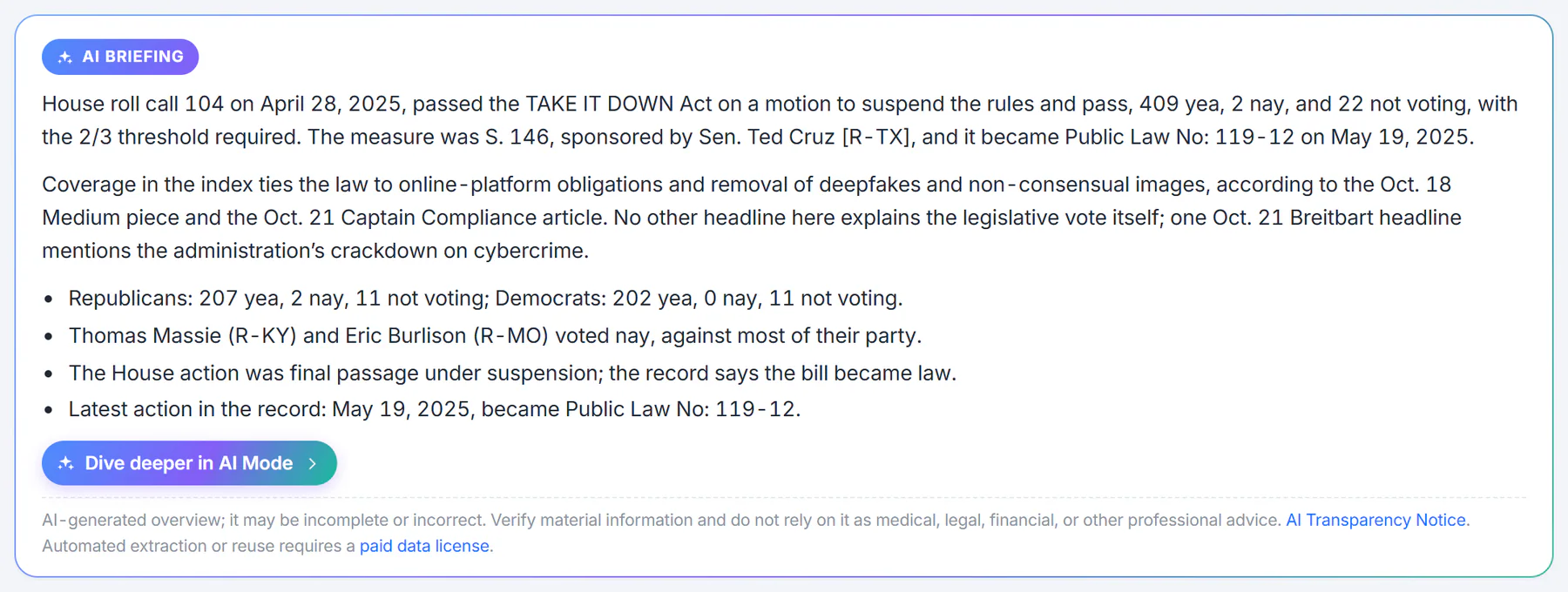
A briefing on a vote page. It is a short summary with bullet points, a way into AI Mode and a reminder that it can be wrong.
- 1The label: AI Briefing
- 2A short summary drawn from this page's records
- 3Specifics: party split, who broke ranks, the next step
- 4Carry on the conversation in AI Mode
- 5A reminder that AI text can be wrong
A briefing on a record page usually has three parts: a sentence or two on what the record shows, a sentence or two on what is happening around it, taken from the recent headlines and credited to their sources, and a few bullet points with specifics such as party splits, members who voted against their party, the bill's next step or a deadline. The overview's briefing covers the whole page, newest first, and says so when Congress has not voted recently instead of presenting an old vote as today's news.
Under the text:
- Dive deeper in AI Mode, where AI Mode is offered, opens AI Mode with the same subject, so you can ask follow-up questions in a conversation.
- A reminder says the text is AI-generated and may be incomplete or incorrect, with a link to the AI Transparency Notice.
If the briefing cannot be written, the box says so and offers a Retry AI overview button. The rest of the page is not affected.
#How a briefing is written to stay neutral
Politics briefings are written to describe what the record shows. They name the people and the dates in the record, credit what comes from news coverage to its source, and say when the data does not cover something. They are written not to say which party, candidate or position is right, not to tell you how to vote or whom to support, and not to predict who will win an election. When they use prediction-market figures, they describe them as traders' implied odds, not forecasts.
#Its limits
- It summarizes only what the page and a handful of headlines give it. It can leave out something important.
- It describes the page; it does not replace reading the bill's summary, the vote's tally or the official text.
- Headlines can be loosely related to the subject. The briefing attributes what it takes from them, so you can open the source.
#Common questions
Why does the box ask me to allow AI answers?
Writing a briefing sends the page's subject, its records and recent headlines to an AI provider, which needs your permission. Select Allow AI Answers to give it, or Manage privacy choices to see your options first.
Why does the box say AI Overview on some pages?
On search results and topic pages there is no single record to summarize, only headlines. The box answers from those headlines and carries the label AI Overview.
Why is there no briefing on a page?
List pages, such as Votes, Bills and Members, do not have one. On other pages the box does not appear when AI answers are not offered on the site.
Can a briefing tell me how to vote?
No. Politics briefings are written not to advise on how to vote or whom to support, and not to predict election results.
Can the briefing be wrong?
Yes. Like any AI text, it can be incomplete or incorrect. Check the page's tables and the official source for anything that matters.